

Cloud-based personal injury software is most useful when it connects work, not just when it stores files. If case details, medical records, correspondence, and deadlines sit in separate tools, staff still have to bridge the gaps by hand. Those handoffs can slow progress and make case status harder to track.
That is the practical distinction firms need to make. A polished feature list does not guarantee that software will fit the way a team manages cases. The right platform should support the workflow from intake through resolution, make relevant information easier to access, and reduce unnecessary manual steps.
This 2026 guide explains the core functions to look for and how to assess security, workflow alignment, integrations, and usability. It also compares personal injury-focused platforms with general legal practice software, so you can evaluate options against your firm’s needs. Finally, it looks at how technology and coordinated case management can connect legal and medical professionals and support more joined-up case workflows.
Key Takeaways
- Assess cloud-based personal injury software by how well it supports your firm’s actual case workflows, not by feature count alone.
- Compare document handling, collaboration, access controls, integrations, reporting, and usability against your team’s essential needs.
- Plan implementation in stages, with a workflow owner responsible for configuration, data quality, and staff training.
- Consider how case-management technology and professional networks can complement each other when coordinating legal and medical workflows.
What Is Cloud-Based Personal Injury Software, and What Does It Connect?
Cloud-based personal injury software is hosted online and accessed through authorized accounts, rather than running only on a particular office computer or local server. Cloud delivery describes how people access the software, not a fixed set of features. Platforms differ in what they store, how they’re hosted, and how they connect with other tools. For a general overview of cloud service models and concepts, see Cloud Computing Fundamentals.
In a personal injury practice, a platform may organize matters, tasks, documents, communications, and case-status information in a shared system. Attorneys can review matter progress, while case managers coordinate records and follow-ups. Operations teams can use case information to support daily processes. When the workflow allows, authorized professional partners may also contribute or access relevant information. The goal is to connect work around a matter, not simply give staff another place to save files.
With cloud access, users typically reach a hosted system through an internet-connected device and an account. Local systems rely more directly on software installed or data stored within a firm’s own environment. Some platforms combine cloud and local components, so the label alone does not describe the full architecture.
Which personal injury workflows can cloud software support?
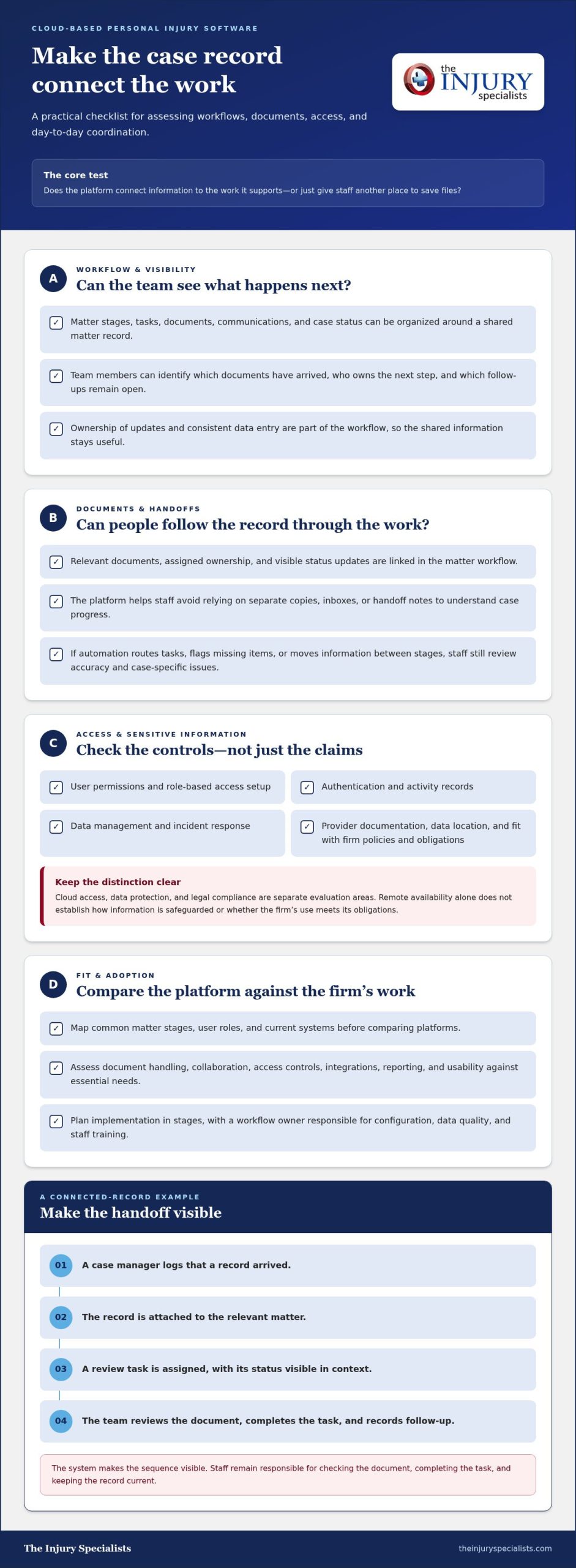
Common functions include matter organization, task assignment, document access, follow-up tracking, and case-status visibility. For example, a team can use a shared matter record to see which documents have arrived, who owns the next step, and which follow-ups remain open. Specialized AI review or document-generation tools may analyze records or help prepare content, but those functions are not inherent to every cloud platform. Assess capabilities against the work your team actually performs.
How does cloud access change day-to-day case coordination?
With centralized information, authorized team members can work from a shared matter record instead of relying on separate copies, inboxes, or handoff notes. Depending on the platform and its configuration, access can be assigned by role. Remote availability can also help staff reach current case information away from the office, subject to the system’s access setup and the firm’s practices.
The operational benefit depends on how the team uses the platform. Clear ownership of updates and consistent data entry help keep matter information useful. Cloud access by itself does not guarantee accurate records, secure handling, or efficient processes. A connected system supports coordination; defined workflows and responsible use make that coordination effective.
How Cloud-Based Personal Injury Software Handles Data, Documents, and Collaboration
A case record is useful when information stays connected to the work it supports. Intake details may lead to records requests, uploaded documents, case activities, follow-up tasks, and notes about what happened. In cloud-based personal injury software, these items can sit within a shared matter workflow, helping authorized team members see current status and next steps.
Depending on the platform, automation can route a task, flag a missing item, or move information between workflow stages. It does not replace human review. Staff still need to check information for accuracy, decide how to handle case-specific issues, and document key actions. Automation can prompt a follow-up, but a responsible team member must assess the response and update the record.
What should firms assess about access and sensitive information?
Evaluate how a platform handles user permissions, authentication, activity records, data management, and incident response. Ask how these functions fit your firm’s policies and applicable obligations, and review the provider’s documentation rather than relying on broad security language. Cloud access, data protection, and legal compliance are separate evaluation areas. Remote availability does not establish how information is safeguarded or whether a firm’s use meets its obligations.
Data location and legal process may also matter to a firm’s assessment. The U.S. Department of Justice provides information about the CLOUD Act and data access. Use it as a starting point for understanding the statute, not as a substitute for evaluating a provider’s practices or seeking legal advice where needed.
How can connected records and tasks reduce operational friction?
Linked documents, assigned ownership, and visible status updates make handoffs easier to follow. Without shared workflows, one team member might save a record in a folder while another notes its arrival in a separate tracker. This can create duplicate records or inconsistent updates, leaving colleagues unsure which version reflects the latest activity.
For example, a case manager logs that a record arrived, attaches it to the relevant matter, and assigns a review task. An attorney can then see the document and task status in context, while the case manager records the follow-up. The system makes the sequence visible; staff remain responsible for checking the document, completing the task, and keeping the record current.
Firms looking beyond document storage can consider how case-management technology works alongside professional coordination. Explore connected case-management workflows as part of a broader personal injury network linking law firms and medical providers.
How to Compare Cloud-Based Personal Injury Software for Your Firm
Compare platforms against the work your firm needs to coordinate, not the length of a feature list. Start by mapping common matter stages, user roles, current systems, and the active cases your team manages. Then use the same scenarios to assess each option, such as assigning a records follow-up, locating a document, or checking who owns the next task.
Separate essential requirements from optional capabilities. Core case management should fit your matter workflows and make responsibilities and status clear. AI review and automation may help with specific tasks, but they do not replace a complete case-management process or staff review. Treat vendor-reported performance figures as claims tied to the vendor’s methods and context, not as results every firm should expect.
Which features matter most for personal injury workflows?
Look for practical coverage across matter visibility, task ownership, document organization, communication, and reporting. If your process involves coordination with medical professionals, assess how the workflow supports that exchange and clarifies responsibilities. A specialized tool may handle one task, such as document analysis, while a case-management platform may organize work across several stages. Determine whether a tool supports an end-to-end process or solves a narrower need.
| Evaluation area | What to assess |
|---|---|
| Workflow coverage | Can the platform reflect your matter stages, task handoffs, and case-status needs? |
| Usability | Can attorneys, case managers, and operations staff complete routine work clearly? |
| Access controls | Do available permissions and administrative settings align with firm policies? |
| Integrations | How does information move between the platform and systems your firm already uses? |
| Reporting | Can staff see useful workload, task, or matter-status information? |
| Support | What onboarding, training, and ongoing assistance are available? |
How should firms compare security, integrations, and usability?
For cloud-based personal injury software, review documented safeguards and administrative controls against your firm’s requirements. Evaluate integrations by tracing a real information flow, including where data is entered, updated, and retrieved. A listed integration does not show by itself how well it fits your existing process.
Test usability with the people who will use the system day to day. Include routine tasks and less frequent handoffs, then note where extra steps, duplicate entry, or training may be needed. Consider onboarding and support as part of adoption, not as afterthoughts. The strongest fit is a platform your team can use consistently across its roles and matter volume, with essential workflows in place before optional automation is added.
How to Implement Cloud-Based Personal Injury Software Without Disrupting Work
A controlled rollout gives your team time to adapt workflows before the platform becomes part of every matter. Treat implementation as an operational change, not just a technical setup. Assign a workflow owner to coordinate decisions, gather feedback, and keep responsibilities for data quality and training clear.
What should a firm map before adopting a new platform?
Document how work moves today, from intake and medical coordination to records handling, case-status updates, and follow-up. Mark where staff re-enter information, ownership becomes unclear, or a handoff stalls. Software can make a process easier to follow, but it will not fix an undefined process on its own. Before configuration, agree on essential workflows and the reports the team needs to manage them.
How can teams support adoption and measure progress?
Roll out cloud-based personal injury software in four stages:
- Map processes: Record current handoffs, pain points, and required reports.
- Configure roles: Set up workflows around responsibilities, access needs, and the firm’s agreed process.
- Pilot representative matters: Test with users from relevant roles and matters that reflect routine work, including common handoffs.
- Expand gradually: Apply lessons from the pilot, provide training, and extend use across the firm in manageable steps.
Training should match each role. Attorneys, case managers, and operations staff may use the same system differently, so show each group how its everyday tasks fit the workflow. Give users a clear way to raise issues and request guidance. The workflow owner can review feedback, distinguish training needs from configuration problems, and coordinate adjustments.
Set a baseline before the pilot, then review practical measures at agreed intervals. Track whether staff use the intended workflows, whether task ownership and case status are visible, and how often teams repeat data entry across tools. These measures can reveal adoption gaps and friction, but they do not prove that software alone caused a change. Use the findings to refine the process before expanding access.
For firms assessing how technology can support personal injury case coordination, Explore The Injury Specialists’ technology and network.
Connect Case Management Software With a Wider Personal Injury Network
Case-management software and a professional network address different parts of coordination. Software can organize matter information, tasks, and status updates within a workflow. A network connects professionals whose work may relate to that workflow. For firms handling personal injury matters, cloud-based personal injury software can support internal organization, while professional relationships help connect legal and medical coordination beyond the firm’s own systems.
Where does software end and professional coordination begin?
Technology can make information easier to organize and follow, but people remain responsible for professional decisions. Attorneys direct legal work, and medical providers make decisions about care. Software replaces neither role. It can help a team coordinate administrative steps, track responsibilities, and keep case-management activity aligned with the firm’s process.
Referral relationships and case-management processes can complement digital workflows by connecting law firms and medical professionals. The value comes from clear roles and appropriate coordination, not from treating a software platform as a substitute for professional judgment or direct services.
How can a connected network support law firms and providers?
The Injury Specialists connects law firms and medical providers through a nationwide personal injury referral and case-management network. Its attorney program incorporates medical case management aligned with a firm’s distinct process. That tailoring matters: a coordination approach should work with the firm’s established responsibilities and procedures, rather than assume every practice handles matters in the same way.
Think of the network and technology as complementary layers. A firm’s platform can organize its internal case activity, while professional connections support coordination across legal and medical participants. Together, these elements offer a broader operational model than software alone, without suggesting that every participant uses the same system or shares unrestricted case information. For a closer look at platform considerations, read the personal injury case management technology guide. The personal injury referral network guide explores the professional network in more detail.
Explore The Injury Specialists’ connected approach to case-management technology and professional networking.
Build a More Connected Case-Management Approach
Choosing cloud-based personal injury software is about more than moving files online. The strongest fit supports your firm’s actual workflows, makes responsibilities and case activity easier to follow, and meets requirements for security, usability, and coordination. A staged rollout, clear ownership, and role-specific training can help turn platform capabilities into consistent day-to-day practices.
Technology and professional networks address different needs. Case-management tools organize work, while professional connections help coordinate across legal and medical teams. The Injury Specialists brings these elements together through a nationwide personal injury referral network and case-management technology designed to align with professional workflows.
Explore The Injury Specialists’ case-management technology and network to see how connected workflows and professional relationships can support your firm’s approach.
Frequently Asked Questions
What is cloud-based personal injury software?
Cloud-based personal injury software is accessed online by authorized users and can organize case information, documents, tasks, and collaboration. Capabilities vary by platform. One system may focus on core matter management, while another specializes in medical record retrieval, chronology creation, or AI-assisted drafting. Before adopting a tool, map the workflows it needs to support and assess its data controls. Cloud delivery alone does not tell you what features or safeguards are included.
Is cloud-based personal injury software secure?
Security depends on the platform’s safeguards, its configuration, and the firm’s own practices. Assess user permissions, authentication, activity records, data handling, and incident procedures. Review the provider’s documentation and compare it with your firm’s policies and applicable obligations. Also consider how staff will use the system in practice. Cloud hosting by itself does not guarantee secure handling, compliance, or appropriate access to sensitive case information.
Can cloud software manage medical records and legal case tasks together?
Some platforms connect documents, tasks, and case workflows, while others focus on a narrower function, such as record retrieval or chronology creation. Map the handoffs your team needs, then determine whether a platform supports them directly or through integrations. For example, a record may need to be received, linked to a matter, reviewed, and followed up. Keep human review and responsibility clear when tools summarize or organize medical information.
How does cloud-based software differ from traditional case management software?
Cloud software is accessed through online services rather than relying solely on applications installed and maintained on a firm’s local systems. Depending on the product, this can support access from different authorized locations and centralized updates. Both cloud and traditional systems can provide case-management functions. Compare how each option fits your workflows, administrative capacity, security requirements, and ongoing operating needs. The delivery model alone does not determine which system is the better fit.
What features should personal injury law firms look for in cloud software?
Start with matter visibility, document organization, task ownership, collaboration, and reporting. Then assess user permissions, security documentation, integrations, training, and support. Consider how the platform handles medical coordination and records if those are part of your firm’s workflow. Prioritize features that address specific process needs, such as tracking who owns a records follow-up. A long feature list matters less than a system your team can use consistently.
How should a law firm implement new cloud case management software?
Begin by mapping current workflows, required data, user roles, and handoffs. Assign an implementation owner, configure roles and permissions, then pilot the system with representative users and matters. Provide training tailored to each role, collect feedback, and expand access in stages. Before the pilot, establish baseline measures such as adoption, task visibility, and repeated data entry. Review progress against those measures and refine workflows; software alone will not resolve process gaps.
Does cloud-based personal injury software replace case managers or attorneys?
No. Software can organize information, surface tasks, and support collaboration, but it does not replace legal judgment, clinical care, or professional accountability. Team members still need to review records, validate information, make decisions, and communicate with clients and providers. Assign a human owner to each workflow, especially when automation summarizes records or drafts materials. Clear responsibilities help ensure software supports professional work without being mistaken for the decision-maker.
