

A faster intake form alone won’t prevent missed inquiries or unclear handoffs. Firms need a managed workflow that captures each inquiry, applies consistent screening, and assigns ownership for the next step. The question of how to streamline client intake process at a personal injury law firm comes down to building that workflow without losing essential information or personal communication.
Slow responses, uneven questions, and details scattered across calls, forms, email, and case systems make it harder to assess inquiries and follow up reliably. A repeatable process can help your team respond promptly, gather consistent information, and route prospective clients to the right next step.
This article outlines how to build that workflow, from centralizing inquiry capture and standardizing screening to assigning clear follow-up responsibility. It also covers the measures that reveal where intake is working, and how to connect captured information with later case-management work and coordination with medical and legal professionals.
Key Takeaways
- Map every inquiry channel and handoff to pinpoint delays, duplicate entry, and unclear ownership.
- Use a defined sequence for capturing, acknowledging, screening, routing, following up, and recording each inquiry’s outcome.
- Compare manual, automated, and hybrid approaches to determine how to streamline client intake process steps, while keeping legal judgment with qualified professionals.
- Track response, contact, completion, progression, and channel trends to identify where intake needs attention.
- Preserve inquiry history, key facts, documents, status, and next steps so useful information carries into case coordination.
How to Streamline the Client Intake Process: Find the Bottlenecks First
Before changing forms, staffing, or software, trace what happens to an inquiry from the first call, email, web form, or chat through screening, a decision, and a documented next step. This reveals where prospective clients wait, where staff repeat work, and where information stops moving. To understand how to streamline client intake process steps, start with an evidence-based view of the current journey, not assumptions about which tool is missing.
Streamlined intake is a measurable workflow, not a single software feature. A tool may support the process, but it cannot fix an unclear handoff or an unanswered question about who owns follow-up.
Map the personal injury intake journey
Sketch each stage in order, from inquiry receipt to initial review, follow-up, and final disposition. Include every channel and the handoffs between staff roles. For each stage, name one owner and a backup, then mark where contact details, incident facts, and documents are first captured and where they are stored.
- Receive: Record the channel, time received, and available contact information.
- Review: Identify who checks the inquiry and what information is needed for initial screening.
- Follow up: Show who contacts the prospective client, records attempts, and sets the next action.
- Document disposition: Record whether the inquiry advances, needs more information, or closes, along with the reason and next step.
Use the map to flag gaps, not to judge staff performance. For example, if a web form is copied into a spreadsheet and then entered again into a case system, note both transfers and who completes them. A handoff without a named owner is a process gap, even when everyone assumes someone else will act.
Measure friction before changing the process
Review a representative sample of inquiries across channels and time periods. Include completed and incomplete records, and trace each one from arrival to disposition. The goal is to find recurring delays and missing information, not to draw conclusions from an unusual case or a single busy day.
- Response time: Elapsed time from inquiry receipt to the first staff response.
- Contact rate: Share of inquiries where staff establish contact, using the same definition of “contact” each time.
- Screening completion: Share of reviewed inquiries with the firm’s required initial screening information recorded.
- Qualified-lead progression: Share of inquiries identified for further review that reach the defined next step.
Keep the denominator and start and end points consistent for every measure. A completed call attempt is not necessarily a successful contact, and a screening record is not necessarily a legal decision. Separate administrative waiting, such as an inquiry sitting unassigned, from time awaiting attorney review. That distinction helps the firm target process friction without treating professional judgment as a delay to eliminate.
Build a Consistent Client Intake Workflow from First Contact to Case Review
A reliable intake workflow gives each inquiry a predictable path while leaving room for staff to handle individual circumstances. Set the sequence first, then define who owns each action, what information they record, and when an inquiry needs escalation. This makes the process operational and repeatable, rather than a checklist that lives in one employee’s memory.
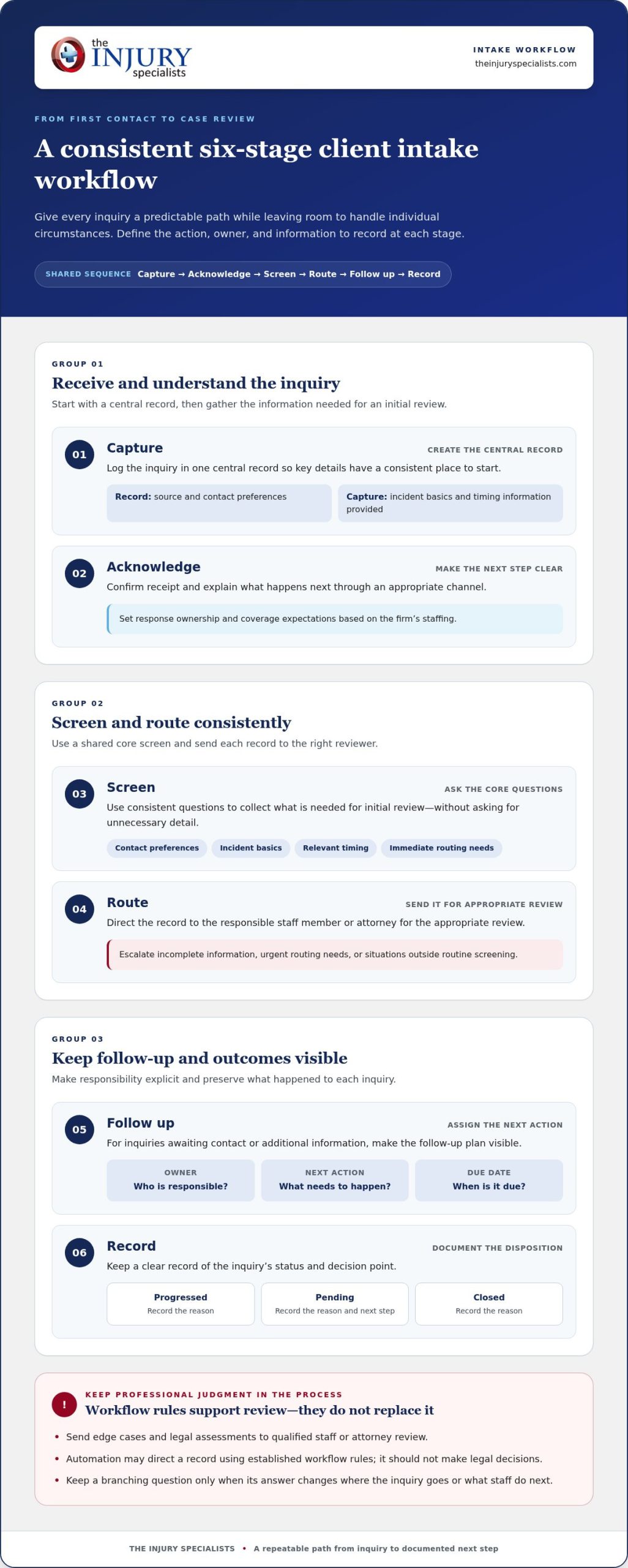
Capture the inquiry, acknowledge receipt, screen consistently, route it to the right reviewer, follow up on schedule, and record the disposition. These six stages form a shared framework across phone, web, email, and other channels.
- Capture: Log the inquiry in a central record, including the source, contact preferences, incident basics, and timing information provided.
- Acknowledge: Confirm receipt and explain the next step through an appropriate channel. Set response ownership and coverage expectations based on the firm’s staffing.
- Screen: Use a consistent core question set to collect information needed for initial review, without asking for unnecessary detail.
- Route: Direct the record to the responsible staff member or attorney for the appropriate review.
- Follow up: Assign an owner, next action, and due date for any inquiry awaiting contact or additional information.
- Record: Document the status, decision point, and reason the inquiry progressed, remains pending, or closed.
Standardize questions and routing
Build a core set of questions around contact preferences, incident basics, relevant timing, and immediate routing needs. Add practice-area prompts only when they help determine the next appropriate step. Branching questions should serve a clear purpose: if an answer won’t change where the inquiry goes or what staff do next, it may not belong in the initial screen.
Define escalation paths for incomplete information, urgent routing needs, or situations outside routine screening. Staff can collect and organize facts, but edge cases and legal assessments should go to qualified staff or attorney review. Automation can direct a record based on established workflow rules; it should not make legal decisions.
Make follow-up and disposition visible
Every active inquiry needs an accountable owner and a visible next action. Record contact attempts and due dates in the same system staff use to review status. Keep labels simple and mutually clear, such as pending contact, awaiting review, follow-up due, and closed. A label should tell the next person what is happening, not just where the record sits.
At disposition, capture a concise reason for the outcome. If the inquiry progresses, note the next review step; if it remains pending, record what information or action is outstanding; if it closes, document the reason. This record supports consistent handoffs and makes patterns easier to review. For firms connecting intake with later case coordination, case management technology aligned with a firm’s process can help carry organized information into subsequent professional workflows.
Compare Manual, Automated, and Hybrid Intake for Personal Injury Firms
Technology can speed up routine steps, but the right intake model depends on the work, the information collected, and where professional judgment is needed. Tool selection should follow workflow needs, not precede process design. First identify which tasks require personal attention and which follow stable rules. Then compare approaches against the same operational criteria.
| Approach | Speed | Consistency | Oversight | Implementation effort |
|---|---|---|---|---|
| Manual | Depends on staff availability and workload. | Can vary across people, shifts, and channels. | Direct staff control at each step. | Lower technology setup, with ongoing time needed for handling and documentation. |
| Automated | Can handle repeatable acknowledgments, structured capture, reminders, and routing promptly. | Applies the same configured prompts and rules consistently. | Needs monitoring and a clear path to human review. | Requires workflow configuration, data-transfer planning, testing, and staff training. |
| Hybrid | Automates routine steps while staff handle assigned review. | Combines standard prompts with human follow-through. | Supports staff oversight at defined decision points. | Requires coordination between automated steps, staff roles, and ownership. |
Choose the right level of automation
Keep handling staff-led when facts are complex, an inquiry needs a sensitive conversation, or immediate judgment matters. Automate repeatable administrative actions such as acknowledgment, structured information capture, reminders, and routing. A hybrid model fits when routine steps can move consistently but a person still needs to interpret the information, clarify gaps, or decide what should happen next.
Automation can sort or flag an inquiry using rules set by the firm. It shouldn’t decide whether a legal claim is viable or replace attorney review. Route exceptions and ambiguous responses to qualified staff, and make that escalation visible so a record doesn’t remain in an automated queue without an owner.
Assess tools against firm workflows
An intake form captures information; a customer relationship management tool may organize prospective-client interactions; a legal case management system supports later matter work. Compare these categories by how they fit the firm’s actual process, not by feature count alone. Check how information transfers between systems, whether staff permissions fit their roles, and whether reports can show the stages the firm needs to monitor.
Plan safeguards alongside functionality. Collect only information needed for the intake stage, define who can access sensitive details, and set retention practices for records and documents. Review consent procedures and applicable legal and ethical requirements for the firm’s jurisdiction and use case. Don’t assume that a tool or workflow is compliant simply because it includes security features. Assign a process owner to oversee configuration, staff training, access reviews, and changes to the workflow.
For firms connecting intake information to later coordination, case management technology tailored to firm workflows can support a more connected handoff. The priority is a system that fits the firm’s process and keeps staff responsible for decisions that require professional review.
Improve Intake Performance with Clear Ownership and Measurable Follow-Up
A dashboard is useful only when someone acts on what it shows. Assign one accountable process owner to review intake performance, coordinate staff input, and track approved changes. That owner doesn’t need to handle every inquiry. Their role is to make sure the workflow has clear accountability, the numbers are interpreted consistently, and recurring issues reach the people who can address them.
Keep the scorecard compact enough to review regularly. Track response, contact, screening completion, progression to the next step, and channel-level trends. Use the same definitions established for your intake process so the team can compare performance over time. Metrics are diagnostic signals, not promises of signed cases or legal outcomes.
Create a practical intake scorecard
For every measure, document its definition, data source, review frequency, and responsible owner. If response time comes from one system but inquiry volume comes from another, note how the data is reconciled. Break down results by channel and time period; add a relevant case category only when it helps identify a meaningful operational pattern.
- Response and contact: Look for channels or periods where inquiries wait longer or contact attempts remain incomplete.
- Completion and progression: Identify where required screening details or the next assigned action are often missing.
- Channel trends: Compare inquiry volume and follow-through across phone, web, email, and other sources.
Review stalled inquiries alongside declined matters, but don’t assume every inquiry should convert. A decline may reflect a legal assessment, capacity, or information that the firm can’t resolve through process changes. The review should distinguish those decisions from preventable gaps, such as an inquiry with no assigned owner or a follow-up action left undocumented. Protect sensitive information in reports and limit access to staff who need it.
Turn findings into controlled process changes
Choose one recurring friction point at a time. Document the issue, the proposed adjustment, who will implement it, and what you’ll review afterward. For example, if one channel regularly produces records missing a key contact preference, revise that channel’s capture step rather than changing every intake question at once.
Train affected staff on revised prompts, routing rules, and recordkeeping expectations before the change goes live. Then compare the same measures over an appropriate review period. Check whether records are more complete, handoffs are clearer, or the original bottleneck persists. Keep changes that improve consistency or clarity, refine those that don’t, and record the reason for each decision. This controlled cycle helps teams improve intake without mistaking a temporary fluctuation for a lasting result.
As intake information moves into later case coordination, aligned systems can support continuity between workflows. Explore personal injury case management technology to see how technology designed around firm processes can support downstream coordination.
Connect Streamlined Intake to Personal Injury Case Coordination
Intake information becomes more useful when it remains understandable beyond the first review. A clear handoff helps authorized team members see what the prospective client shared, what has happened so far, and what needs attention next. It also reduces the risk that important context gets separated from the inquiry as it moves into later case-related workflows.
Prepare information for the next workflow stage
Keep a consistent record of the inquiry history, captured facts, relevant documents, current status, and next action. Include enough context for the receiving team member to understand prior contact and outstanding tasks without reconstructing the record from scattered messages. Transfer only information needed for the next step, following applicable privacy requirements and firm policies. Name the receiving owner and document the next action to make the handoff explicit.
For example, a record moving from initial screening to further review should distinguish information supplied by the prospective client from items that still need review. Note the source of documents, current status, and any follow-up already completed. This supports continuity without turning an administrative summary into a legal conclusion or a medical assessment.
Extend coordination across the injury-care ecosystem
Personal injury matters can involve law firms, medical providers, and imaging centers, each with distinct responsibilities and information needs. Clear records can help support coordination across these professional workflows, while preserving the boundaries between them. Intake staff can organize and route information; legal decisions remain with qualified legal professionals, and medical-care decisions remain with qualified medical professionals.
That distinction matters when firms establish law firm medical referral programs or coordinate with physician referral services for personal injury. The goal is a reliable connection between appropriate professionals, not an automated recommendation about legal representation or treatment. Case management technology can support documentation and workflow alignment, but it doesn’t replace professional judgment or the decisions made by the people responsible for care and legal review.
The Injury Specialists connects injury victims with medical and legal professionals through a national referral network, medical case management, and technology designed to support professional workflows. For firms considering how intake information can carry into later coordination, its professional network and case-management approach offers a relevant next step. Consistent handoffs can give each authorized participant a clearer view of the information and next action relevant to their role.
As you refine your intake workflow, treat the handoff as part of the process, not an afterthought. Review whether the receiving team can identify the inquiry’s status, understand what has already been done, and take the next appropriate action without unnecessary duplication. That connection between intake and downstream coordination helps keep information useful while respecting the responsibilities of each professional.
Make Intake a Stronger Foundation for What Comes Next
The next step is to treat intake as a firm-wide operating capability, not a project that ends when a new form or system goes live. As staff, channels, and workflows change, revisit whether the process still supports clear ownership and dependable coordination. Build that review into team onboarding and routine process discussions so improvements remain usable over time.
Keep asking how to streamline client intake process workflows: what would make the next handoff clearer for the people responsible for acting on it? That focus helps firms adapt without losing sight of professional boundaries or the needs of the people involved.
The Injury Specialists connects injury victims with medical and legal professionals through a national network, with case-management technology designed around law firms’ distinct processes and documentation needs. Explore The Injury Specialists’ professional network and case-management approach to plan the next stage of your workflow. A thoughtful, connected process gives your team a stronger foundation to build on.
Frequently Asked Questions
How do you streamline a client intake process at a law firm?
Start by making it easy to see who is responsible for each open inquiry and what action is due next. A shared record can connect the original message to later notes, documents, and status changes, reducing the need to search separate inboxes. Firms improving their intake workflow should also define an exception path for unusual inquiries, so they receive individual attention instead of getting stuck in a routine queue.
What is the first step in improving law firm client intake?
Review actual inquiry records before changing the process. Select examples from different channels and trace what staff did, where information was recorded, and whether anyone had to clarify or re-enter details. Include inquiries that moved forward and those that didn’t. This helps distinguish a form-design problem from a handoff or staffing issue, so the first improvement addresses a demonstrated cause rather than a general impression.
Can client intake be automated without losing personal communication?
Yes. Automate administrative tasks that benefit from consistent handling, such as confirming receipt or sending a reminder, while reserving conversations that require clarification or sensitivity for staff. For example, a form can capture preferred contact method, then a team member can use that preference when discussing missing information. Review automated messages for a clear tone and an obvious route to a person when the inquiry doesn’t fit the standard path.
Which client intake metrics should a law firm track?
Track measures that show both access and follow-through: time to first response, successful contact, completion of required screening fields, and movement to the next defined review step. Add channel and time-period breakdowns to spot patterns hidden by an overall average. Define each measure consistently. For instance, distinguish an attempted call from a two-way conversation, and report incomplete records separately from inquiries that staff have reviewed.
How can a law firm handle intake information securely?
Use firm-approved systems and give access only to staff who need particular information for their role. Avoid copying sensitive details into personal email, unapproved messaging tools, or informal spreadsheets. Establish how documents are shared, how access changes when responsibilities shift, and how long records are retained under firm policy and applicable requirements. Train staff to verify recipients before sending information, especially when communicating across organizations.
When should a law firm use intake software?
Consider intake software when staff struggle to see inquiry status, repeat data entry, or coordinate ownership across channels. First identify the specific problem, then test whether a form, customer relationship management tool, or case-management system addresses it without creating another disconnected record. A limited pilot with representative staff can reveal usability and data-transfer issues before the firm relies on the system across its full intake operation.
How should a law firm follow up with a prospective client?
Follow up using the contact method the person prefers, and make each message specific to the outstanding next step. If information is missing, request only what is needed for that step and explain how the person can provide it through an approved channel. Record attempts and the planned next action so another team member can continue appropriately. Set the follow-up cadence according to firm policy and the nature of the inquiry.

Leave A Comment
You must be logged in to post a comment.