

Disconnected software can turn a straightforward matter update into unnecessary work. Integrating technology in a law firm means connecting systems such as case management, billing, and document platforms so information moves between them instead of being repeatedly entered or tracked in separate places. The goal is a clearer view of each matter and a more consistent client experience.
Choosing software is only part of the decision. The right integrations depend on how the firm works, which tasks create friction, and what its practice area requires. This article explains what integration involves, how connected systems can support timely updates and transparency, and how to prioritize technology around workflows and business goals.
Key Takeaways
- Connect case management, billing and document systems to reduce fragmented workflows and build a clearer view of each matter.
- Use connected processes to support timely client updates and make matter progress easier to understand.
- Prioritise technology around a specific workflow problem, the people who use the system and the business outcome you need.
- Shape the technology stack around firm size and practice area rather than assuming one setup fits every law firm.
Connecting case management, billing, and document systems
Case management, billing, and document platforms work best when they share accurate matter information. A connected workflow gives staff and firm leaders a more unified view of active work.
Case Management Platform Integrations
A case management platform can serve as the central hub for matter details, correspondence, and related financial data. Integrations link it with billing and document systems, helping keep information synchronized instead of requiring staff to re-enter it. For example, a matter update can flow into connected records, reducing duplicate entry and the risk of inconsistent details. The benefit depends on how well those connections support the firm’s actual workflows.
Employee needs and confidential case management also shape integration decisions. A paralegal may need access to case documents, while billing staff need time-entry information. Assigning access by role keeps work relevant and limits unnecessary exposure of sensitive matter details. Clear instructions for common tasks help employees use connected systems consistently, including when a workflow crosses case management and billing platforms.
Connected data can support performance reviews without separating them from matter work. A firm can gather input from attorneys involved in a case and include billable-hours data from third-party systems in its review process. Matter-based reviews give managers useful context for evaluating contributions. The process should clearly identify which matter information and billing measures inform an assessment.
Document Management and Version Control
Document management organizes matter files, while version control distinguishes current drafts from earlier versions. When document systems connect with case management, staff can associate correspondence and files with the right matter. For example, a team preparing a contract can identify the working draft and retain earlier versions for context. Consistent file naming and clear ownership help prevent employees from editing or sharing an outdated document.
Integration quality matters: only 4% of firms surveyed were very satisfied with their existing level of integration. Separate systems can force staff to switch platforms and duplicate data. Mapping how case details, documents, and billing information move through a matter helps firms identify where a connection can reduce extra handling.
Improving client service and transparency
Connected client-service processes help teams share accurate updates and give clients a clearer view of matter progress. Each update depends on current information and clear ownership.
Client Confidentiality and Data Security
Protecting client confidentiality and data means safeguarding sensitive matter information as legal technology systems store, process, and share it. Connected workflows can expose information across departments if access is not controlled. Role-based permissions, encryption, and multi-factor authentication can help limit access and protect records as they move between platforms.
For example, a billing employee may need financial details but not every document in a client file. Firms should understand how each technology tool processes and stores client data, then align access with staff roles. Secure cloud storage and clear access controls can support this approach.
Legal Analytics and Client Expectations
Legal analytics use matter information to support reporting, decisions, and client communication. They can help a firm explain progress with relevant data rather than relying on disconnected updates. For example, a team can use current matter information to prepare a status report showing completed work, open tasks, and the next expected milestone.
Clients expect useful legal analytics, so firms benefit from reporting that is accurate, timely, and easy to understand. Shared processes help departments work from consistent information. They also clarify who owns the next update and what details it should include.
Professional Rules for Technology Use
In the United States, lawyers’ technology use is governed by professional obligations to protect client confidences. The American Bar Association cites Opinion 477 as a summary of recommendations for assessing cloud providers and technology vendors, including reviewing qualifications, security policies, contract protections, and data ownership.
These considerations matter when selecting or connecting legal tech. Firms should understand how a vendor handles client information and what protections the contract provides. For injury-focused legal workflows, case management technology is a relevant part of the broader integration conversation.
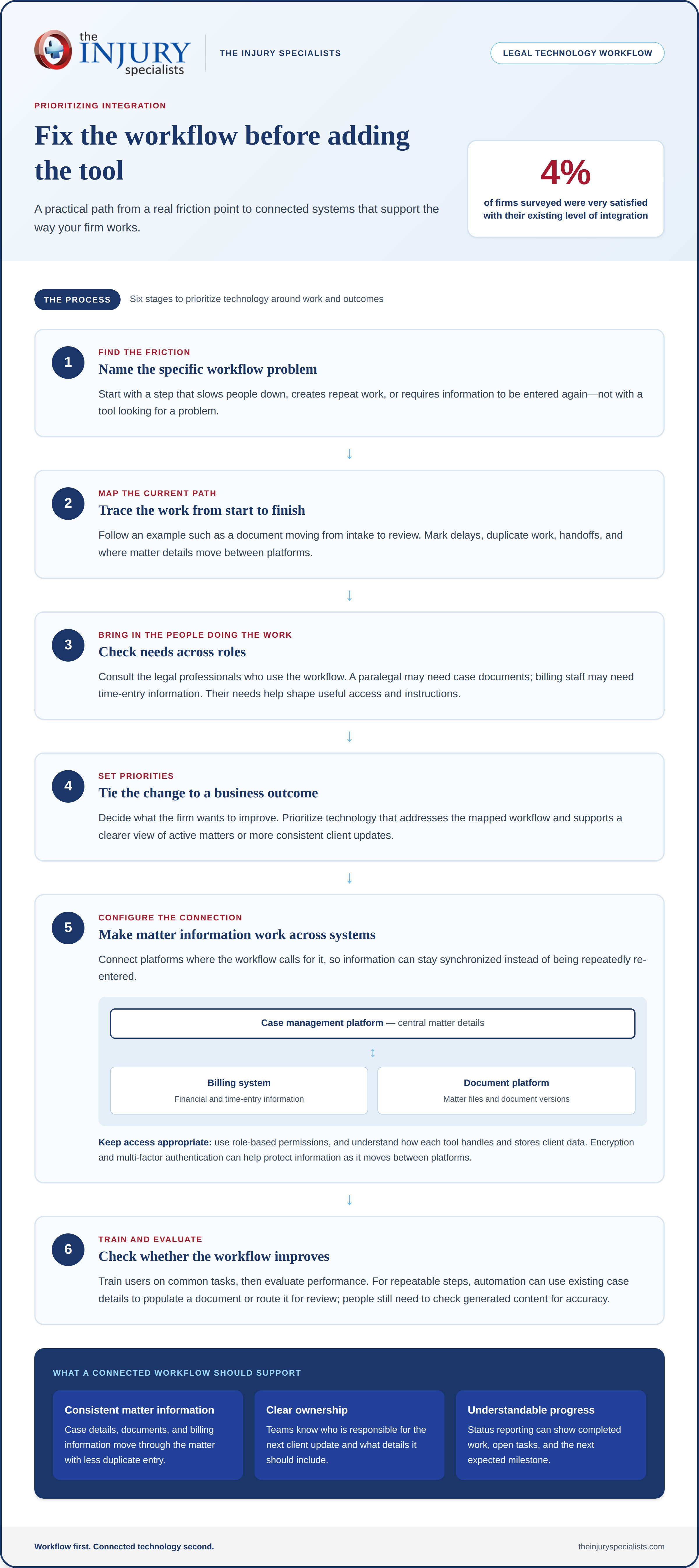
Prioritising integration by workflow and business outcomes
Prioritize technology around a specific workflow problem and the outcome the firm wants to improve. Start by consulting the legal professionals doing the work and identifying the steps that slow them down.
Automated Documents and Workflow Automation
Workflow automation uses connected systems to handle repeatable tasks such as document generation, time tracking, and client updates. It is most useful when staff repeat the same steps across matters or re-enter information between platforms. For example, a matter workflow can use existing case details to populate a document and route it for review. Legal professionals still need to check generated content for accuracy before using it.
Assessing Needs and Implementing Technology
Assessing technology needs starts with identifying a problem, mapping the current workflow, and involving the people who use it. For example, a firm can trace how a document moves from intake to review, noting delays, duplicate work, and handoffs. This shows whether a new platform addresses a real need or adds another step.
Implementation should follow the workflow: set priorities, configure the tool, train users, and evaluate its performance. During cloud migration, firms can review legacy processes and consider whether newer technologies or APIs simplify work and ongoing maintenance. Include employee self-service in the design. Tools such as Slack or Microsoft Teams can connect routine HR tasks with collaboration workflows.
Integration Risks and Return on Investment
AI and automation can process information quickly, but legal work still requires human judgment, especially when nuance affects the result. Set review points for AI-generated work, define which tasks remain lawyer-led, and monitor how client data moves through each tool. This helps ensure speed does not replace careful analysis.
Measure return on investment against the original problem. Compare the time a task takes before and after implementation, then assess accuracy, rework, adoption, and how promptly clients receive updates. If document automation aims to reduce repetitive drafting, for example, track completion time and corrections. Talent planning matters too: evaluate whether integrated workflows reduce administrative strain and help legal professionals focus on substantive work as the firm’s needs evolve.
Choosing a technology stack by firm size and practice area
A useful technology stack fits the firm’s workflows, matter types, and operational capacity. Firm size matters, but the legal practice and its daily work should guide the final choice.
Comparing Legal Practice Management Platforms
Legal practice management platforms combine tools for organizing matters and supporting related firm workflows. Compare platforms based on their fit with the firm’s practice area, ability to connect with existing systems, and support for employees’ day-to-day work.
A small firm with a focused caseload may prioritize straightforward matter tracking and document access. A larger firm or one with several practice groups may need broader reporting and connections across departments. Similar products can differ, so assess them against real tasks rather than choosing by feature count alone. A contract-focused practice, for example, may value document workflows differently from a personal injury practice.
Technology and Implementation Costs
The cost of law firm technology depends on the tools selected and the work needed to implement them. Licensing, data migration, integrations, configuration, and staff training all shape the total investment.
Replacing a standalone tracking tool, for example, may require less migration work than moving a firm’s matter records and documents to a new platform. Include ongoing support and maintenance in the evaluation alongside implementation effort. This gives leaders a fuller picture of the resources required, rather than comparing purchase prices in isolation.
Technology Vendors and Support Services
US law firms can evaluate vendors across categories such as practice management, billing, document management, and legal research. Implementation, training, integration assistance, and ongoing technical support may also be part of the service.
Compare vendors based on the firm’s size, practice area, and manual processes. A firm with several offices may prioritize consistent access and reporting, while a specialized practice may focus on matter-specific workflows. Assess integration fit and support arrangements together, then choose the stack that addresses the firm’s highest-priority needs. This keeps technology decisions grounded in the legal practice, not the broader software landscape.
The Injury Specialists: Attorney Referral Program, medical case management based on firms distinct process, marketing and networking to grow referral partners.
The Injury Specialists can help firms strengthen referral relationships and coordinate medical case management around their distinct processes. Its Attorney Referral Program combines medical case management with marketing and networking to help grow referral partnerships.
For firms focused on operational coordination, The Injury Specialists’ Case Management Technology can complement broader decisions about connected workflows. The right fit depends on whether the priority is referral development, case management, or both. Firms looking to expand healthcare connections can also use Physician Referral Services and Chiropractic and Physical Therapy Referrals.
Contact The Injury Specialists to discuss referral growth and case management support for your firm.
Make technology part of the firm’s next phase
Keep the technology roadmap active as the practice and client expectations evolve. Assign someone to review system performance, gather staff feedback, and decide which workflow needs attention next. This ongoing discipline helps ensure useful tools remain connected to the way the firm actually works.
Set a clear review point after each significant change. Consider whether employees can complete key tasks smoothly, whether clients receive clear communication, and whether the technology still supports the firm’s priorities. Use those observations to guide the next decision rather than adding tools without a defined purpose. Integrating technology in a law firm works best as an ongoing operational choice, not a one-time project.
If strengthening professional connections is part of your firm’s next phase, connect with The Injury Specialists to discuss a path forward. With a focused roadmap and the right partnerships, your firm can keep building a more connected client-service operation.
Frequently Asked Questions
What is law firm software integration?
Law firm software integration connects separate tools so relevant information can move between them. For example, integrating technology in a law firm might link matter records with billing entries and document storage. Staff can then work from associated records instead of recreating information in each tool. The outcome depends on which systems connect and whether their data fields and workflows align.
How can law firms reduce manual data reconciliation?
Law firms can reduce manual reconciliation by assigning a consistent matter identifier across connected systems and defining which system owns each data field. For example, designate one source for client contact details and another for invoice status. Establish a process for exceptions, such as duplicate records or mismatched matter numbers, so staff can resolve discrepancies without repeatedly comparing full files.
How secure is data access?
Data security depends on a platform’s safeguards and the firm’s configuration and practices. Use role-based permissions, multi-factor authentication, encryption, and secure cloud storage to protect sensitive information. For example, a temporary team member should receive only the access needed for assigned work. Review permissions when responsibilities change, and understand how each tool stores and processes client data.
What are the risks of disconnected legal systems?
Disconnected legal systems can leave staff working from inconsistent records, duplicate information, and frequent switching between tools. A document saved outside its matter record, for instance, may not appear alongside the latest correspondence. Separate platforms can also make reporting less reliable when teams reconcile information differently. Mapping key handoffs helps reveal where missed updates or repeated entry could affect service.
What technologies are most useful for law firms?
The most useful technologies support the firm’s actual work: case management, billing, document management, time tracking, secure communication, and reporting. A firm handling document-heavy matters may prioritize document search and version organization, while another may need stronger matter tracking. Choose tools based on recurring tasks, integration needs, security controls, and the people who will use them, not feature count alone.
How can law firms train staff and encourage adoption of new technology?
Law firms can support adoption with practical, concise training tailored to each role. Use sample tasks drawn from everyday work, such as opening a matter, saving a file, or recording time. Provide searchable instructions for less-used features and identify a clear support contact. Gather employee feedback after launch, then adjust workflows where staff encounter repeated friction or avoid the new tool.

Leave A Comment
You must be logged in to post a comment.