

A timeline can look complete and still mislead a case if a date, source, or conflict is wrong. To create a medical chronology, gather relevant records, arrange encounters by service date, summarize each event neutrally, and cite the source document and page. Flag missing records, treatment gaps, conflicting details, and unclear dates instead of guessing.
For personal injury lawyers, a chronology is more than an organized record: it makes treatment easier to review during case assessment, demand preparation, depositions, and litigation. This guide explains how to create a medical chronology, distinguish documented facts from open questions, and check each entry against the original record. You’ll also learn how lawyers use timelines to trace care, identify issues for closer review, and understand the medical history relevant to a claim.
Key Takeaways
- Build the timeline around date-of-service entries, with each event linked to its source record.
- Distinguish a chronology’s dated event-by-event structure from a summary’s broader overview of the records.
- Flag missing records, treatment gaps, conflicting details, and unclear dates instead of filling in assumptions.
- Review every entry against the original record to catch omissions, duplicate events, and inaccurate references before legal use.
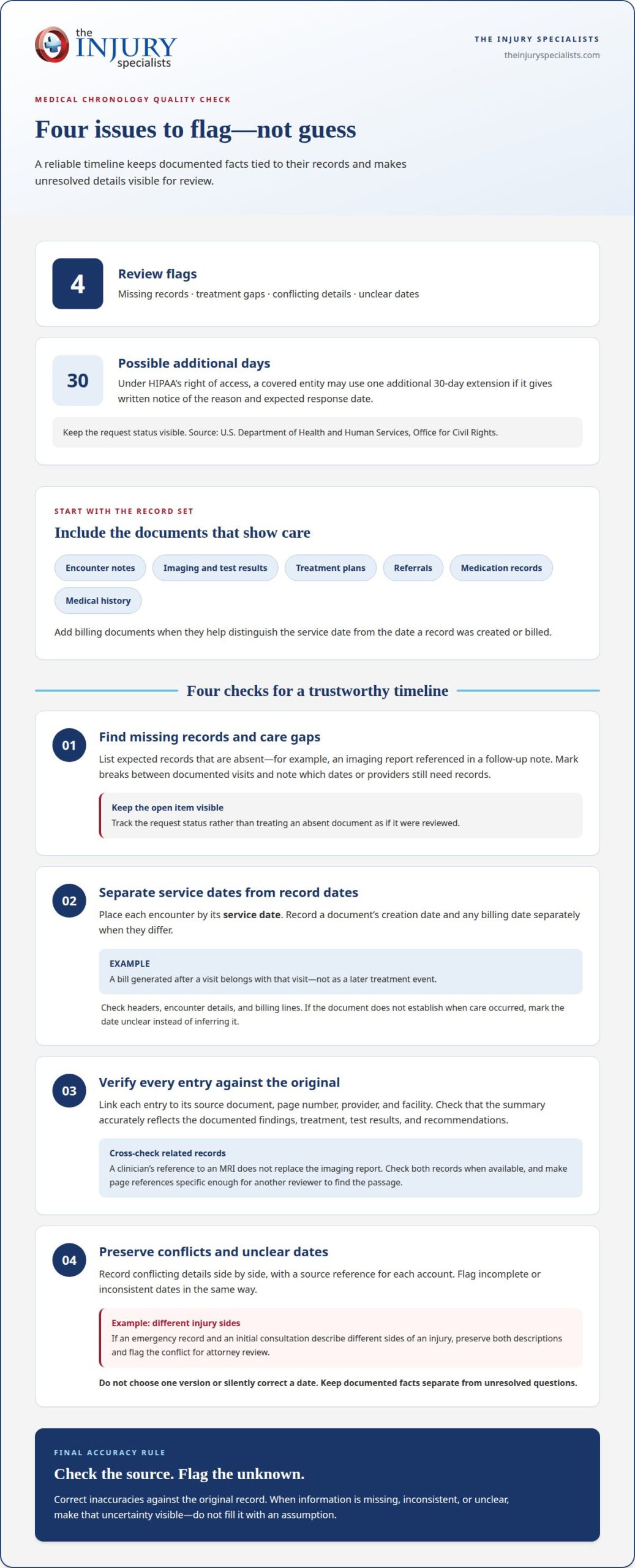
Missing records, care gaps, conflicts, and unclear dates
Include relevant encounter notes, imaging and test results, treatment plans, referrals, medication records, and medical history. Add billing documents when they help distinguish the service date from the date a record was created or billed.
-
Identify Missing Records and Treatment Gaps
List each expected record that’s absent, such as an imaging report referenced in a follow-up note. Mark treatment breaks between documented visits and note which dates or providers need records. Under HIPAA’s right of access, a covered entity may use one additional 30-day extension if it gives written notice of the reason and expected response date, according to the U.S. Department of Health and Human Services, Office for Civil Rights. Keep the request status visible.
-
Compare Treatment Dates With Record Dates
Use the service date to place each encounter in the chronology. Record the document’s creation date and any billing date separately when they differ. For example, a bill generated after a visit belongs with that visit, not as a later treatment event. Check headers, encounter details, and billing lines before assigning dates. If a document does not establish when care occurred, mark the date unclear rather than infer it.
-
Verify Entries Against Original Records
Link each chronology entry to its source document, page number, provider, and facility. Confirm that the summary reflects the original findings, treatment, test results, and recommendations. A clinician’s reference to an MRI does not replace the imaging report, so check both records when available. Correct inaccuracies against the original and make the page reference specific enough for another reviewer to find the passage quickly.
-
Document Conflicts and Unclear Dates
Record conflicting details side by side, with a source reference for each account. For example, if an emergency record and an initial consultation describe different sides of an injury, preserve both descriptions and flag the conflict for attorney review. Flag incomplete or inconsistent dates in the same way. Don’t choose one version or silently fix a date; keep documented facts separate from unresolved questions.
What Is a Medical Chronology and Why Does It Matter?
A chronology arranges medical events by date, while a summary presents a broader narrative of care. Give each a distinct purpose: the timeline helps locate details, and the narrative explains how documented treatment progressed. A consistent format also helps legal teams focus their record review.
-
Distinguish Chronologies From Medical Summaries
Build the chronology as dated entries, not as a running interpretation of the incident. Each entry captures a specific encounter and its documented findings. Then prepare a separate narrative summary that connects the course of treatment in concise, objective language. When learning how to create a medical chronology, keep analysis separate from recorded facts. Attorneys can use the timeline to locate events for a deposition and the summary to understand the overall sequence.
-
Organize Entries by Date, Provider, and Event
Sort entries by service date, then identify the provider, facility, and event type. Use a consistent format for emergency care, follow-up visits, imaging, and therapy. Include the complaint, diagnosis, treatment, test results, recommendations, and source reference. If multiple events occur on one date, give each encounter its own entry so readers can distinguish providers and findings. This structure makes how to create a medical chronology a repeatable process.
-
Prepare the timeline in a clear sequence.
Collect relevant records, identify each encounter, extract documented facts, and arrange entries chronologically. Use a consistent date format and neutral language. A chronology should help legal teams find information, not reproduce every sentence in the record. Software can help organize the material, but a reviewer must ensure each entry accurately reflects its source.
-
Protect sensitive records and keep summaries objective.
Treat medical records as sensitive health information. Limit access to authorized case personnel and use secure, approved systems that meet applicable privacy requirements. Report what the provider documented, and separate questions or legal analysis from clinical facts. For example, state that a record reports back pain rather than concluding that the incident caused it.
For teams coordinating medical and legal workflows, medical case management support can help connect case processes with relevant professionals.
Reviewing chronology accuracy and completeness
Review the timeline against the medical records before attorneys rely on it. Check source references, clinical details, sequence, and later updates as separate quality-control steps.
- Reconcile every entry with its source. Match the date, provider, facility, encounter type, page reference, and summary to the original record. Confirm that imaging findings, diagnoses, treatment, and recommendations are represented accurately. If a note describes a patient’s pain as improving, preserve that wording rather than changing it to resolved. Flag missing or illegible details for review instead of filling them in.
- Run a completeness and consistency check. Scan the timeline from the earliest relevant visit to the latest record. Look for duplicate encounters, omitted documents, inconsistent date formats, and variations in provider names. Compare each diagnosis and treatment description with its source. Check whether a test result, such as imaging, has a separate report that adds to or clarifies the findings. Keep documented facts distinct from questions about causation.
- Review AI-assisted extraction with a qualified human. Automated tools can organize large record sets, but extraction errors may alter dates, diagnoses, or provider details. A reviewer should compare extracted text with the original page, especially for scanned records, abbreviations, and handwritten notes. Attorneys should also assess outputs for bias and protect confidentiality when entering patient information into a tool.
- Control updates and preserve the review trail. Add newly received records to the correct date range, then recheck affected entries and references. Maintain an audit trail showing what changed, when it changed, and who made the change. Save a clearly identified current version so attorneys can distinguish it from earlier drafts. Before sharing, check the revised timeline for duplicate entries, omissions, and changes without source support.
When personal injury lawyers use chronologies
Use a personal injury chronology to connect the client’s medical record with practical legal work. A sample template can include columns for service date, provider, event, factual summary, source reference, and follow-up questions.
- Apply the timeline during case assessment. A paralegal can arrange emergency care, follow-up visits, imaging, and therapy around the reported injury. Attorneys can then compare documented symptoms and diagnoses with the treatment sequence. The chronology helps locate facts for review; it doesn’t prove that an incident caused an injury. Keep possible causation issues separate from the factual record.
- Use source-linked entries to prepare for discovery. Before requesting information or preparing questions, identify the record that documents each event. For example, a therapy note may describe limited movement, while an imaging report records a separate finding. Clear references help attorneys return to the underlying document and frame focused follow-up. A paralegal should preserve differing accounts rather than smooth them into one narrative.
- Prepare deposition and demand materials from verified facts. Attorneys can use the chronology to locate treatment milestones, recommendations, and documented limitations. Before a deposition, it can help organize questions by encounter and provider. For a demand, a concise narrative can explain the documented course of care without overstating what the records establish. Keep opinions and unresolved questions distinct from the factual summary.
- Update the case picture as records arrive. New treatment notes or imaging findings may change which events need attention. Add each relevant encounter, retain its source reference, and review how it fits the existing sequence. Attorneys can then use the updated timeline during case evaluation, settlement discussions, or litigation preparation. The key takeaway: a useful chronology supports decisions by making records easier to navigate, not by replacing legal analysis.
For firms building connected case workflows, explore the Attorney Referral Program and its medical case management support.
The Injury Specialists
The Injury Specialists supports coordination around personal injury cases through medical case management and professional referral programs. A chronology can help a legal team identify where communication among attorneys, healthcare providers, and imaging centers matters to case workflows. The company’s Attorney Referral Program includes medical case management tailored to a firm’s distinct process, along with marketing and networking to grow referral partnerships.
Healthcare professionals can also use Physician Referral Services, Chiropractic and Physical Therapy Referrals, and Imaging Center Referrals to build connections across relevant services. These offerings support referral relationships and case coordination; they do not replace an attorney’s legal analysis or a clinician’s medical judgment.
Contact The Injury Specialists to discuss how its referral connections and medical case management can support your firm or practice.
Put Your Chronology to Work
A medical chronology can be more than a case-preparation document. Use it as a working reference to help legal and healthcare teams coordinate around documented care, unresolved questions, and next steps. Update it as relevant records arrive, and use source references to keep discussions grounded in the record.
Knowing how to create a medical chronology also helps firms establish a consistent process for organizing case information across their teams. The Injury Specialists supports professional referral connections and medical case management, helping legal and healthcare professionals build workflows suited to their needs.
To discuss support for your firm’s referral network or case management process, contact The Injury Specialists. Take the next step toward a more connected, well-organized workflow.
Frequently Asked Questions
Should chronology entries link back to the source records (Bates numbers and hyperlinks)?
Yes. Give each entry a precise page reference or Bates number so a reviewer can locate the supporting record. A hyperlink to the relevant PDF page can make navigation easier, but it should supplement, not replace, the citation. Identify the document and page alongside the link. If files move or links break, stable Bates references still help attorneys find the source.
What Do I Do with Conflicting Information?
Preserve both accounts and identify the document supporting each one. For example, if two notes describe different injury locations, quote or summarize each record neutrally and mark the discrepancy for attorney review. Don’t choose which account is correct or combine them into a single version. Keep any follow-up question separate from the documented facts so the conflict remains visible.
What’s the Best Software to Use for This?
The best fit is software that supports the team’s workflow and keeps entries connected to source records. Look for searchable documents, consistent fields, clear page references, and a change history showing revisions. Before relying on automated extraction, test whether it accurately captures dates, provider names, and findings from the records in your case. Have a qualified reviewer examine the output.
What is a medical chronology and what is it used for?
A medical chronology is an organized account of care-related events that helps a legal team navigate a patient’s records. For example, an attorney preparing to discuss a later procedure can use it to find preceding consultations and documented recommendations. It supports case review and preparation, but the timeline itself does not establish medical causation or replace legal judgment.
How to cite medical records and page numbers in a chronology?
Place a source reference beside each entry, using the document title or type, provider or facility, and specific page or Bates number. For example: “Imaging report, treating facility, page 3.” Keep the citation format consistent throughout the file. If a PDF page differs from a printed page number, state which numbering system the reference uses.
How to handle conflicting dates, gaps, and errors in medical records?
Keep the date shown in each source, record what type of date it is, and flag discrepancies without silently changing them. Separate a service date from a note’s creation date when both appear. Mark an unexplained interval as a gap, and note which event or record could clarify it. If a source appears erroneous, preserve its wording and flag the issue for review.
