

The right fit is the system that supports your firm’s personal injury workflow, not simply the one with the longest feature list. When choosing personal injury case management software, prioritize clear communication, useful integrations, appropriate security, and a setup that works for your team. A platform should make it easier to manage case details, medical records, deadlines, and settlement activity in a coordinated process.
Software can reduce administrative friction, but a poor workflow fit may add steps instead. Your caseload, team structure, existing tools, and approach to provider coordination all affect which features matter most.
This guide explains how to compare software for communication, integrations, security, and day-to-day fit. You’ll also learn how different platform types serve different firm needs, what to assess in a practical comparison, and how to narrow your options to a system that supports your operation as it grows.
Key Takeaways
- Match software to your firm’s case flow, including how your team organizes documents, deadlines, treatment updates, and liens.
- Assess whether communication tools help your team coordinate with clients, providers, and carriers without creating disconnected workflows.
- Map the integrations your firm relies on, then distinguish direct connections from processes that depend on workarounds.
- Evaluate medical-record safeguards alongside treatment-tracking needs, and consider how referral and case management support can strengthen coordination.
Automated client, provider, and carrier communication
Communication tools should make updates clear and keep messages connected to the case record. Compare how each option handles client access, provider coordination, carrier correspondence, and permissions.
Automated Client Updates
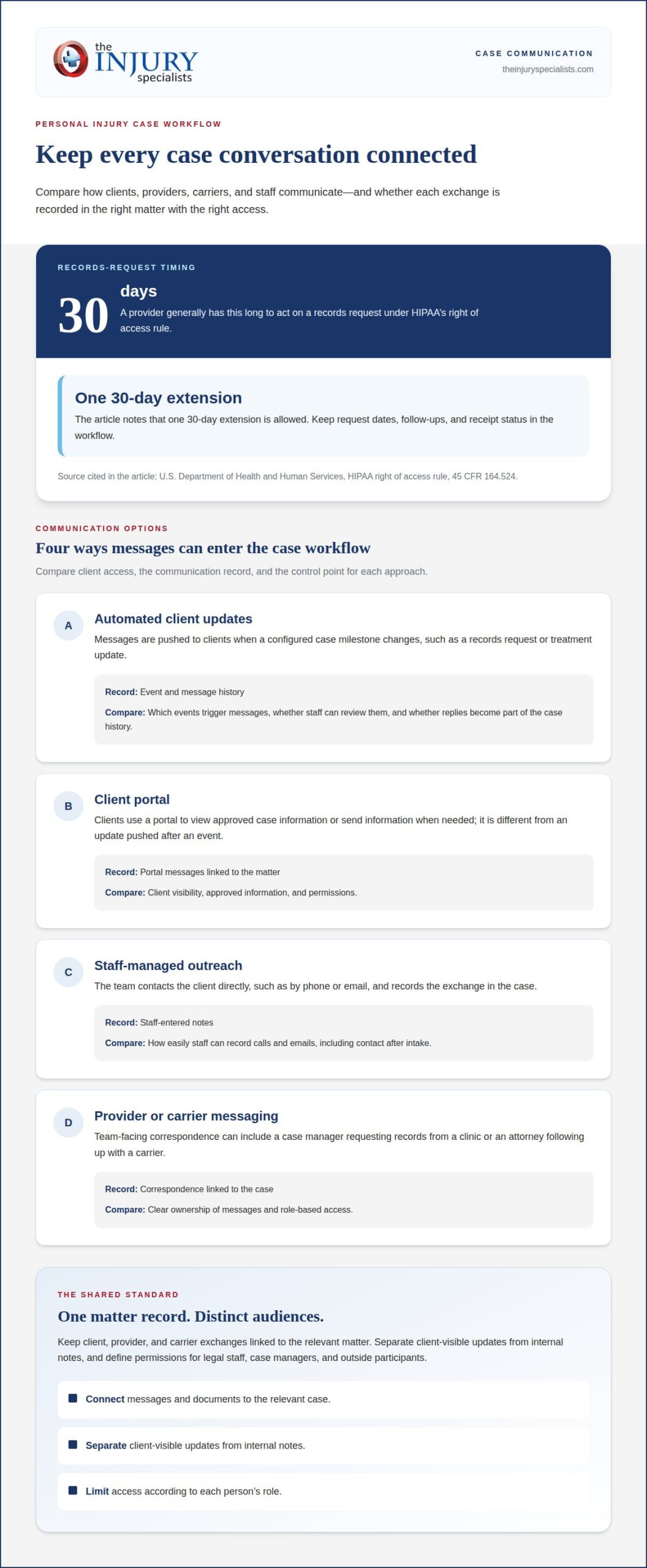
Automated updates send clients status messages when a case milestone changes, such as a records request or treatment update. A portal works differently: clients use it to view or send information, while updates deliver selected information to them. For an injury firm, assess which events trigger messages, whether staff can review them, and whether replies become part of the case history.
Client Portals and Communication Records
A client portal gives clients a place to view approved case information and communicate with the practice. Unlike automated updates, which arrive after configured events, a portal lets clients access information when needed. Look for records that connect each message to the relevant matter, including staff notes about a phone call or an email sent after intake.
Provider and carrier messages need clear ownership, too. A case manager may request records from a clinic, while an attorney follows up with a carrier about a claim. Keep those exchanges linked to the matter and limit access by role. Separate client-visible updates from internal notes, and define permissions for legal staff, case managers, and outside participants.
Records requests also affect communication timing. According to the U.S. Department of Health and Human Services, under HIPAA’s right of access rule at 45 CFR 164.524, a provider generally has 30 days to act on a records request, with one 30-day extension allowed. A software workflow can help staff record request dates, follow-ups, and receipt status.
| Option | Client access | Communication record | Best comparison point |
|---|---|---|---|
| Automated updates | Messages pushed to clients | Event and message history | Trigger and staff review |
| Client portal | Client views approved information | Portal messages by matter | Visibility and permissions |
| Staff-managed outreach | Direct contact by the team | Staff-entered notes | Ease of recording calls |
| Provider or carrier messaging | Usually team-facing | Correspondence linked to case | Role-based access |
Choose a setup that records client, provider, and carrier exchanges in the matter while preserving distinct access for each audience.
Which personal injury practice management software is right for you?
The right platform connects case documents, deadlines, medical treatment, and liens through workflows your team can use. Compare how each system handles daily casework, reporting, automation, and implementation. A deliberate approach to choosing personal injury case management software starts with the tasks your staff performs most often.
Case and Document Management
Case and document management brings matter details, records, deadlines, treatment updates, and lien information into one workspace. Reporting summarizes activity, while automation moves tasks forward. For example, link a medical record to its provider, treatment date, and related follow-up, while keeping deadlines visible to the staff member responsible.
Document automation can generate repeatable items from approved templates. A demand-package workflow, for example, might assemble selected case details and supporting documents for staff review before use. Compare how the platform organizes versions, links documents to matters, and routes drafts for review. These steps show whether automation supports your personal injury practice or adds extra work.
Reporting and Automation
Reporting shows case status across a practice; automation applies rules to recurring tasks. The strongest reporting and automation fit tracks relevant case stages and turns defined events into assigned work. For example, a report could group matters by treatment status, while an automation creates a records follow-up task when a request remains open. Compare how easily teams can adjust reports and workflows.
Software Costs
Cost compares ownership needs rather than case-management capability. Personal injury software pricing depends on the case and is provided after a quote request; cost factors include user access, features, storage, onboarding, and migration. Compare plan details against your firm’s required workflows. An entry price may not reflect the full cost of adding functions or moving documents into the system.
Vendor Demo Questions
Use a demo to test a realistic matter, from intake through treatment tracking and document preparation. Ask the vendor:
- Can the system link deadlines, medical documents, treatment, and liens to one case?
- Can staff generate a document from a template and review it before saving?
- Which reports can teams filter by case status or assigned staff?
- Can managers change automation rules without rebuilding workflows?
- What steps support data migration and staff onboarding?
Teams choosing personal injury case management software should compare the answers against their actual process, not a generic feature list. Firms aligning case workflows with operational support can explore case management technology.
Integrations for email, accounting, intake, and AI
Integrations connect case management with tools a law firm already uses. Compare what information moves, where it appears, and whether the connection is direct or requires a workaround.
Email and Accounting Integrations
Email integration can link a client or provider message to its case instead of leaving it only in an inbox. Check whether staff can save an email and its attachments to the correct matter without duplicating records. Accounting connections serve a different purpose: they can align case activity with financial workflows. Identify which accounting tasks the connection supports and which still require separate entry.
Practice management may also include client payment processing for firms handling matters that require billing. Treat this as a distinct integration need, not a substitute for case-related financial tracking. During comparison, trace a sample payment from the client interaction to the relevant accounting record. Confirm how the system handles status, reconciliation, and staff access before relying on the workflow.
Intake and AI Integrations
Intake integrations move prospective client details into the case system, reducing repeated entry between intake forms and matter records. Compare which fields transfer, how staff correct errors, and whether a new inquiry becomes a case automatically or remains subject to review. AI connections differ because they may assist with selected tasks rather than transfer routine records. Define the task, review step, and record trail.
For example, test whether an AI tool can organize intake information into fields your team uses, then review the result before it enters a matter. Keep human review in the workflow, especially when generated content could affect client communication or litigation preparation. A useful integration supports the existing process instead of creating another place to manage deadlines and case data.
Mobile Access and Third-Party Integrations
Mobile access lets staff use case information away from a desk, while third-party integrations connect separate applications. Mobile access supports work across locations; an integration moves data between tools. Test a realistic task on a phone, such as reviewing a deadline or recording a client call, then check whether updates appear in the main case record.
Before selecting practice management software, map each required connection to a workflow: email correspondence, accounting, intake, or litigation support. Confirm whether the platform supports the integration directly or depends on a third-party workaround. That distinction affects how staff manage data, deadlines, and follow-up across the firm.
Are purpose-built PI platforms secure for handling medical records?
Assess security and workflow fit together. Medical records, treatment updates, witness statements, and settlement details need clear organization and controlled access. Compare how a platform handles each item from upload through review, collaboration, and case closure.
For medical record tracking, follow a sample matter through the system. Can staff organize records by provider, visit, and treatment stage? Can lawyers identify missing records or compare treatment dates with case milestones? A useful workflow connects each document to its source and related notes instead of leaving files in an unstructured folder.
Witness statements and consultant materials also need context. Store each item with its matter, date, author, and review status. For a medical consultant’s opinion, define who can view the document, add comments, or share it with the legal team. These controls help separate working notes from materials prepared for broader case collaboration.
Track financial details alongside the medical timeline. For example, record a lien, outstanding balance, and settlement status as distinct case fields. Then check whether the system shows who entered each update and lets staff correct errors without losing the record’s history. That visibility supports consistent case review.
Review permissions, access records, data handling, and any certifications the vendor identifies. Ask which certification applies to the platform, what it covers, and how current documentation is provided. A certification alone does not show how your firm’s users receive access. Test separate roles for an attorney, case manager, and administrative staff member.
Use the same sample case to evaluate medical-record storage, treatment tracking, expert collaboration, and settlement reporting. Record gaps between the workflow your lawyers need and the platform’s demonstrated capabilities. For firms that need operational support alongside case coordination, explore medical case management as a complementary resource.
The Injury Specialists
The Injury Specialists supports personal injury firms with case management technology and professional coordination. If your software decisions involve medical case management, provider referrals, or referral-network growth, these services can complement the workflows you’re evaluating. The Attorney Referral Program includes medical case management based on a firm’s distinct process, along with marketing and networking to grow referral partners. Physician Referral Services also combine medical case management with marketing and networking to increase referral partners.
Firms seeking coordinated provider connections can also use chiropractic and physical therapy referrals, imaging center referrals, and physician referrals. These offerings support referral and case management needs around a firm’s processes; they don’t replace the firm’s software evaluation. Consider this support when your operational priorities extend beyond organizing case files to include provider coordination or growing referral relationships.
Contact The Injury Specialists to discuss referral and case management support for your firm.
Put Your Next Workflow in Motion
Make your software decision part of a broader operational plan. Before implementation, identify a workflow your team wants to strengthen and define what a smooth handoff should look like. This gives staff a practical reference point as they adopt new tools and coordinate work across the firm.
A deliberate approach to choosing personal injury case management software can also reveal needs beyond the platform itself. Referral relationships and medical case management may be important to how your firm coordinates personal injury matters. The Injury Specialists supports firms through referral programs, medical case management, and marketing and networking to grow referral partners.
Connect with The Injury Specialists to discuss how its professional support can align with your firm’s priorities. Contact The Injury Specialists to start the conversation and identify a practical next step. Your firm can move forward with a clearer plan for the systems and partnerships that support its work.
Frequently Asked Questions
Which Type of PI Case Management Software Fits Your Firm?
A purpose-built PI platform often fits firms whose daily work centers on injury claims and medical-legal coordination. A general legal practice system may better suit firms handling several practice areas, while a modular setup can connect separate tools. For example, a firm with a dedicated intake system should assess whether it can pass new matter details into its case workflow without duplicate entry.
What About Mobile Access and Third-Party Integrations?
Mobile access matters when attorneys or case managers update files away from their desks. Test a real task, such as recording a client call after a meeting, and see whether the update reaches the correct matter. For third-party integrations, map each connected tool to its business purpose. A connection that transfers only contact details may not support the broader workflow your team expects.
What capabilities should PI firms prioritize when choosing software?
Prioritize capabilities that address your firm’s operational bottlenecks and case mix. A team that often coordinates with providers may value structured referral and treatment updates, while a litigation-focused team may need clear task ownership and matter-level visibility. Identify a recurring delay, then trace how software would handle it from the first staff action to the final recorded update.
What features should personal injury case management software include?
Look for features that support a case from initial inquiry through resolution, including intake records, task assignment, document organization, treatment history, and settlement-related fields. Then examine how the platform handles exceptions. For example, staff should be able to correct a client’s contact details or reassign a task while preserving the matter’s useful history and context.
How do personal injury firms compare case management software platforms?
Compare platforms using the same sample matter and evaluation criteria. Have staff complete a representative task, such as moving an inquiry into an active file, recording a provider update, and locating the latest case note. Record where each workflow requires duplicate entry, manual handoffs, or extra navigation. Include the people who will use the system daily in the assessment.
Which case management software integrates with legal billing, accounting, and e-signature tools?
The right option depends on the billing, accounting, and e-signature tools your firm uses. Integration availability and depth vary by platform, so assess each required connection separately. For a sample matter, follow a document for signature and a financial entry through the connected workflow. Note whether information transfers directly, requires staff action, or relies on a separate workaround.
