

Technology can make a law firm more efficient, but profitability depends on whether it improves the work behind the numbers. To increase law firm efficiency with technology, firms can connect communication tools, practice management software, cloud document storage, and automation to reduce repetitive work and keep matters moving. These tools support stronger workflows; they don’t replace sound legal judgment or thoughtful management.
It’s understandable to focus on billable work and case results when assessing profitability. But scattered documents, missed follow-ups, and manual administrative tasks can also consume valuable time. The right technology helps teams coordinate work and find the information they need without adding unnecessary complexity.
This article explains how communication tools can support client service, how practice management software brings work together, and how cloud storage and automation can streamline routine processes. It also covers how to assess technology in your firm’s workflows and how specialized case management technology can support coordination.
Key Takeaways
- Connect client communications with eFiling and digital signatures to reduce delays and keep matter updates organized.
- Use practice management software to bring matter details, calendars, documents, and billing into a more coordinated workflow.
- Centralize documents in cloud-based systems so teams can access current files and collaborate more smoothly.
- Start automation with repeatable administrative tasks, then assess how case management technology can support broader coordination.
1. Client communication, eFiling, and digital signatures
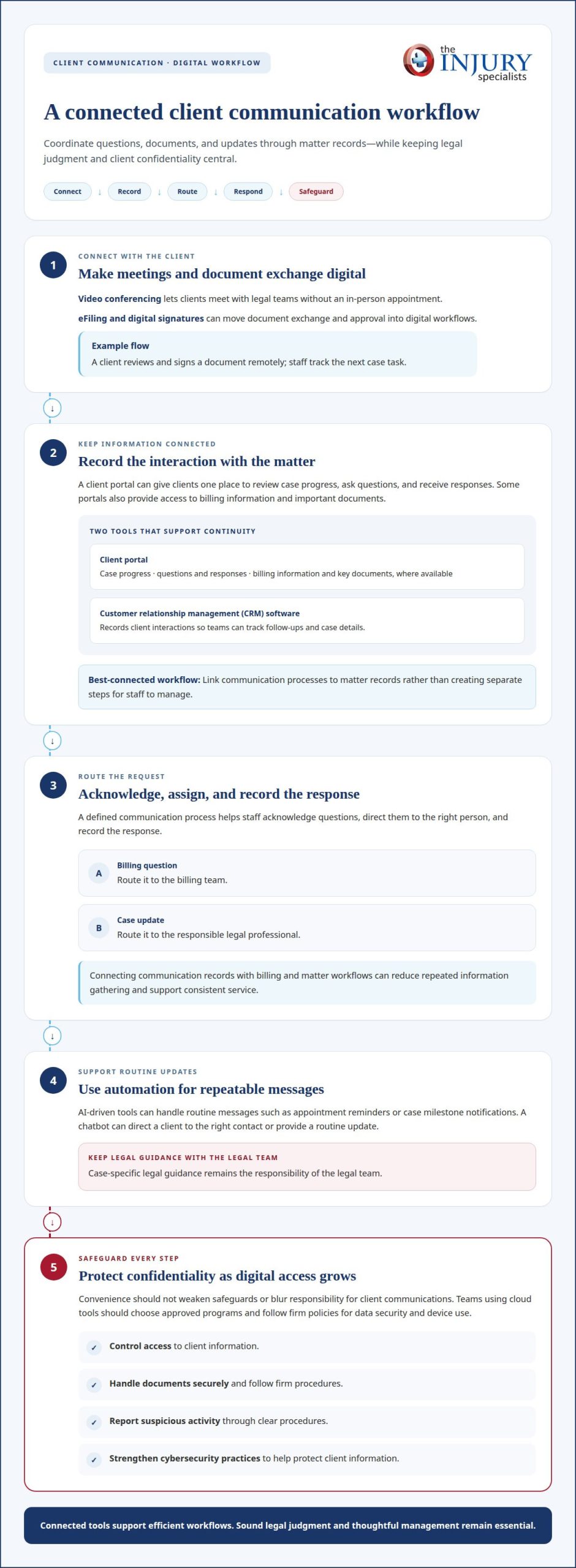
Video conferencing lets clients meet with legal teams without an in-person appointment. eFiling and digital signature tools can move document exchange and approval into digital workflows. For example, a client can review and sign a document remotely while staff track the next case task. These tools work best when they connect to matter records and communication processes, rather than creating separate steps for staff to manage.
A client portal gives clients one place to review case progress, ask questions, and receive responses. Some portals also provide access to billing information and important documents. Customer relationship management software can record client interactions so teams can track follow-ups and case details. AI-driven tools can handle routine messages, such as appointment reminders or case milestone notifications. A chatbot can direct a client to the right contact or provide a routine update, while case-specific legal guidance remains with the legal team.
Clients expect timely responses and high-quality service. A defined communication process helps staff acknowledge questions, route them to the right person, and record the response. For example, a billing question can go to the billing team, while a case update goes to the responsible legal professional. Connecting communication records with billing and matter workflows can reduce repeated information gathering and support consistent service.
Digital access must go hand in hand with confidentiality safeguards. As legal data collection and analysis increase, lawyers should strengthen cybersecurity practices to help protect client information. Teams using cloud tools should choose approved programs and follow firm policies for data security and device use. Access controls, secure document handling, and clear procedures for reporting suspicious activity help protect confidential information. Technology supports efficiency only when convenience does not weaken safeguards or blur responsibility for client communications.
2. What is practice management software?
Practice management software organizes matters, contacts, documents, calendars, communications, and billing in a shared system. A firm can use an integrated suite for connected workflows or combine specialized tools for functions such as accounting and document management. Suites centralize information, while modular setups let firms select functions individually. The right fit depends on existing processes and system needs.
Technology decisions also require training and oversight. A firm can map staff roles to relevant functions, then train attorneys and support teams using familiar tasks, such as opening a matter or recording time. For AI-assisted legal research and drafting, attorneys should treat generated material as research assistance and verify sources and citations before relying on it. They should also protect confidential information when using these tools.
Software costs depend on the features selected, user access, data migration, integrations, and training or support needs. Compare options based on those factors and the workflows they support, rather than relying on a per-user figure alone. For accounting, assess whether a system supports the firm’s billing processes and trust-account reconciliation. Define who reviews entries and resolves discrepancies.
Before choosing technology, document how a matter moves from intake through legal work, billing, and closure. Staff input can reveal manual handoffs, duplicate entry, and delays. Then map those needs to relevant features, identify integration requirements, and plan a staged rollout with role-based training. For virtual law firms, assess how attorneys access matter information remotely and coordinate work across locations.
AI tools can assist with legal research, document review, and drafting, but attorney review remains central. A practice platform can track matter progress and resource allocation, helping teams identify bottlenecks. For firms coordinating injury matters, case management technology can complement internal workflows with case management support.
The main options are an integrated suite that connects workflows in one system or a modular setup that combines specialized tools, such as separate accounting and document management software. Suites centralize information, while modular setups let firms choose functions individually. The better fit depends on existing processes, system needs, integrations, and the workflows each option supports.
3. Cloud-based document management
Cloud-based legal platforms give attorneys and staff remote access to matter files, documents, client communications, and critical deadlines. A team member working away from the office can open the current matter file and see its related materials. Centralized document management helps teams work from the latest version and reduces versioning errors. Among surveyed attorneys whose firms used document management software, 94% said the tools made document sharing easier.
Document access matters when a case contains hundreds or even thousands of pages. A consistent filing structure helps staff locate pleadings, correspondence, and supporting records without searching disconnected folders. For example, a case team can group documents by matter and type, then use consistent names to distinguish drafts from final files. This structure supports collaboration and helps prevent outdated documents from shaping case work.
Cloud-based case management can connect documents to deadlines, tasks, and matter status. Practice management and analytics features can show where work is accumulating, how resources are allocated, and which steps are slowing progress. Managers can use that information to adjust assignments and monitor billable work. Viewing matter activity alongside document records makes operational patterns easier to spot.
Customer relationship management software adds the client relationship layer. Interaction records help staff see prior conversations and follow-up needs alongside case details. When CRM and case management processes connect, teams can reduce duplicate entry and build more complete matter histories. For instance, logging a client communication against a matter gives the assigned team context before responding. Together, cloud storage, document management, and analytics create a more coordinated flow of information across legal operations.
4. How can document automation help my law firm?
Start with repeatable tasks that follow clear rules, such as opening a matter, generating a standard document, or sending a payment reminder. A provider can map intake steps, connect relevant forms to matter records, and configure templates for routine drafting. For legal research, AI tools can help locate information, but lawyers should review sources and citations before using results in legal work.
Document automation can populate approved templates with matter details, reducing repeated entry across standard forms. Staff still need to review drafts for accuracy, context, and case-specific language. Identify which documents have stable fields and which require attorney judgment, then build review points into the workflow. This keeps automation focused on predictable tasks rather than decisions requiring legal expertise.
Billing workflows can connect captured time to invoice generation. More than 80% of lawyers use legal time-tracking software, as reported in the MyCase Legal Industry Report. Automated time capture can record billable work within daily workflows, while prompts can remind attorneys to log activity after completing a task. The same report found that 73% of surveyed lawyers said their firm struggled to get paid. Automated invoices and payment reminders can help organize collections follow-up.
Assess intake, drafting, billing, and research workflows by documenting handoffs, repeated data entry, and approval points. Then configure suitable tools, test them against real examples, and train staff on revised processes. Start with one frequent, low-complexity task, measure whether it reduces manual steps, and refine the workflow before extending automation. This keeps productivity improvements relevant to actual legal work.
For firms seeking structured support around injury matters and referral relationships, explore attorney referral support.
The Injury Specialists: Physician Referral Services, medical case management, marketing and networking to increase referral partners.
The Injury Specialists supports law firms seeking to strengthen referral relationships and coordinate injury-related case management. Its Attorney Referral Program includes medical case management tailored to each firm’s distinct process, along with marketing and networking to grow referral partners. Case Management Technology supports firms using technology as part of their case coordination approach.
For firms building professional connections, Physician Referral Services and Chiropractic and Physical Therapy Referrals provide relevant pathways. These services can complement internal workflows by connecting referral growth with case management support. The right fit depends on the firm’s referral goals and how its existing processes handle cases and professional relationships.
Contact The Injury Specialists to discuss your firm’s referral and case management needs.
Turn better workflows into a focused growth plan
Technology decisions work best when they address a clear business priority. Before expanding the firm’s systems, identify the most important operational constraint, then define what a better process should make possible. That focus helps leaders distinguish useful improvements from added complexity and gives teams a shared way to evaluate progress.
A thoughtful roadmap also connects internal operations with the professional relationships that support a firm’s work. The Injury Specialists can support firms pursuing referral growth and coordinated case management through its Attorney Referral Program. Aligning that support with the firm’s priorities gives leadership a practical next step beyond software decisions alone.
To increase law firm efficiency with technology, treat each change as part of an operating strategy, not an isolated purchase. Set a clear objective, assign ownership, and review whether the new process helps the team work more effectively. The right next step is the one that strengthens how your firm operates and grows.
Start a conversation with The Injury Specialists about supporting your firm’s next stage of growth.
Frequently Asked Questions
Can Technology Take Your Law Firm Profitability to the Next Level?
Technology can support profitability when it reduces avoidable effort or helps a firm use its resources effectively. Start by comparing workload and revenue across client types, case types, or attorneys. That view can help leaders decide where to focus staffing or process improvements. Software alone doesn’t determine financial results. Its value depends on how well it supports the firm’s priorities.
How Can Law Firms Increase Efficiency With Tech?
A firm can increase law firm efficiency with technology by targeting a costly workflow problem, then selecting tools that fit the process. For example, pilot an integrated intake-to-matter workflow with one team before extending it. Include support staff in planning because they see daily handoffs firsthand. Review whether the new setup reduces duplicate work or delays, and adjust training or integrations if friction remains.
How can document automation help my law firm?
Document automation can help a firm produce recurring forms from consistent matter information. It works best for documents with repeatable structures and fields, such as a standard intake form or routine correspondence. Attorneys should review completed drafts for context, accuracy, and case-specific needs. For AI-assisted research, treat generated material as a starting point and check sources and citations before using it in legal work.
How do electronic signatures benefit law firms?
Electronic signatures let clients and other authorized signers complete documents without arranging an in-person signing. This can keep a matter moving when participants work remotely or have conflicting schedules. A clear process identifies who must sign, where the completed document belongs, and who follows up on outstanding signatures. Saving the final document with its matter records helps the team find the executed version later.
Productivity – a quantum leap?
Assess productivity gains through specific workflow results, not dramatic labels. A firm can compare how long a recurring task takes, how often work needs correction, and whether staff can complete more valuable work afterward. For example, review a routine document process before and after automation. The key question is whether the change improves the firm’s actual work, not whether a tool promises a dramatic leap.
What is practice management software?
Practice management software helps organize a firm’s matter operations in one coordinated environment. Beyond storing information, it can help teams track case progress, allocate resources, and spot bottlenecks. For example, a manager may notice that a recurring approval step holds up several matters and address the underlying handoff. Firms should assess how well a platform supports their workflows, staff roles, and existing systems.

Leave A Comment
You must be logged in to post a comment.